

The 2026 FIFA World Cup: Everything You Need to Know
For the first time ever, the FIFA World Cup is being jointly hosted by three nations: the United States, Canada, and Mexico. Running from 11 June to 19 July 2026, the tournament spans 39 days, features 48 teams, and packs in a record 104 matches across 16 host cities, 40 more games than Qatar 2022.
The opening match takes place at Estadio Azteca in Mexico City, one of the most iconic venues in football history, as Mexico face South Africa. The final is set for MetLife Stadium in New Jersey on 19 July, with the semifinals being held at AT&T Stadium in Dallas and Mercedes-Benz Stadium in Atlanta.
With 48 teams split across 12 groups of four, the top two from each group, plus the eight best third-placed teams, advance to a round of 32. That means more upsets, more drama, and more football than any World Cup in history. If you’re planning to stream any of it, now is the time to get your setup sorted.
Introducing OBScoreboard’s World Cup 2026 Scoreboard Overlay
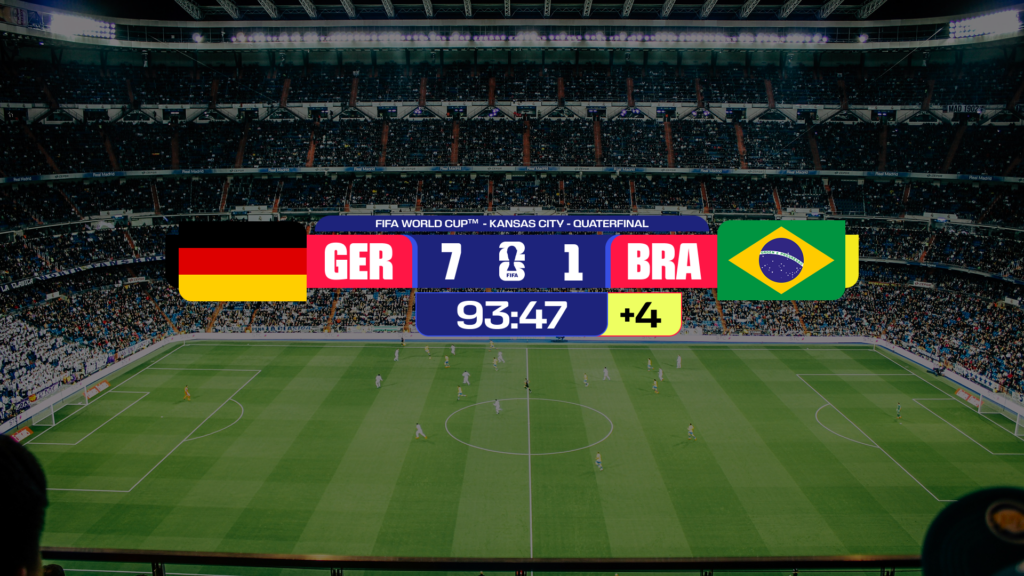 We’ve built a purpose-built World Cup 2026 scoreboard overlay for streamers, content creators, sports broadcasters, and football fans who want their livestreams to look professional. Drop it into OBS Studio or any browser-source compatible streaming tool, and you’re live in minutes, no design skills required.
The overlay gives you a live scoreboard with team names, national flags, a match clock, goal event tickers, and full remote score control. It’s designed for clarity at 1080p and 720p, so your viewers can read the score at a glance whether they’re watching on a TV or a phone.
What’s Included in the World Cup Overlay
- Real-time scoreboard with team names, national flags, and a live match clock
- Goal event ticker — display scorer name, minute, penalty or own goal indicator
- Half-time and full-time score card for clean transitions between periods
- Group stage standings table overlay — show live group tables during the group phase
- Knockout bracket display for the round of 32 through to the final
- Remote score control — update scores from your phone without touching your stream PC
- All 48 national team flags included out of the box
- Compatible with OBS Studio, Streamlabs, vMix, Wirecast, and any browser-source tool
How to Add a World Cup 2026 Scoreboard Overlay to OBS Studio
Getting started takes less than five minutes:
- Sign up for a free OBScoreboard account at obscoreboard.com
- Select the World Cup 2026 football template
- Enter your two teams and set the starting score
- Copy your unique overlay URL
- In OBS Studio, add a new Browser Source to your scene and paste the URL
- Control scores live from your phone or any browser, no switching windows mid-stream
The scoreboard updates instantly across all connected devices the moment you change the score. No page refreshes, no delays.
Use Cases: Who Is the World Cup 2026 Scoreboard Overlay For?
The World Cup only comes around every four years, and with 104 matches to cover, there’s a huge range of ways streamers and creators are putting our overlays to work.
Watch-Along Streams
React to every match live with a professional scoreboard overlay keeping your audience in the picture. Whether you’re watching alone or with guests, a live score ticker transforms a basic reaction stream into a proper broadcast. Your audience sees the score, the minute, and any goal events in real time, so nobody misses a thing even if they’re watching with the sound low.
Football Commentary and Analysis
Football podcasters and YouTube analysts can run a live score ticker in the corner of their stream while breaking down tactics, previewing matches, or dissecting post-match stats. The overlay keeps the conversation grounded in what’s actually happening on the pitch, without cluttering your scene.
Pub Screens, Fan Parks, and Venue Displays
Bar owners, fan parks, and sports venues screening matches on big displays can add a live score overlay to their stream setup for a broadcast-quality atmosphere. With remote control from a single phone, staff can update the score between serving customers, no dedicated stream operator needed.
Community TV Channels and Student Unions
Local community channels, student unions, and university sports societies running their own World Cup coverage can produce professional-looking output without expensive broadcast hardware. Our browser-based overlay works with any streaming setup that supports a browser source.
Fantasy Football and Prediction Shows
Fantasy football streamers and prediction show hosts can display live scores as results come in, reacting to league tables and bracket outcomes in real time. The group stage standings overlay is perfect for showing your viewers exactly where teams stand as the group phase unfolds.
Schools and Universities
Student unions and sports departments organising screening events on campus can give their productions a polished, professional look, with no technical expertise required. OBScoreboard is used by hundreds of educational institutions who want broadcast-quality overlays without broadcast-level budgets.
Sports Journalists and Media Outlets
Independent sports journalists and small media outlets covering the World Cup for online audiences can add credibility to their streams with a clean, broadcast-style scoreboard overlay, the kind of professional touch that keeps viewers watching and builds subscriber trust.
Why a Dedicated World Cup Scoreboard Overlay Matters for Your Stream
Viewers watching a World Cup stream make a judgement in the first few seconds. A clean, readable scoreboard tells them they’re in good hands, that you’ve put care into the production. It keeps them from tabbing away to check the score elsewhere. And during a tense match, it’s one less thing your audience has to think about, which means they stay focused on your commentary and your content.
Generic on-screen text or a hand-drawn overlay doesn’t cut it at this level. The World Cup 2026 is going to attract millions of new streaming viewers across Twitch, YouTube, and TikTok Live. Standing out with a professional setup is one of the simplest ways to hold onto them.
 Pricing: Free to Try, Affordable to Keep
OBScoreboard is free for 7 daysays. Paid plans start from $9/month and include full access to all World Cup 2026 overlay features, including the group stage table, knockout bracket display, and remote score control. There’s no long-term commitment; you can cancel anytime.
With the opening match on 11 June 2026, you have time to set up, test your scenes, and go into the group stage with a production you’re proud of.
Frequently Asked Questions
Does the World Cup 2026 scoreboard overlay work with OBS Studio?
Yes. OBScoreboard works as a browser source inside OBS Studio, Streamlabs, vMix, Wirecast, XSplit, and any other streaming software that supports browser sources. No plugins or downloads are required beyond your existing streaming setup.
Can I control the score from my phone during a live stream?
Yes. Once your overlay is live in OBS, you can update the score, add goal events, and switch teams from any browser, including on your phone. Changes appear on your stream instantly.
Does it include national team flags for all 48 World Cup teams?
Yes. All 48 qualified nations are pre-loaded with their national flags. You simply select the two teams from a dropdown when setting up your match, and the flags appear automatically in the overlay.
Is there a group stage table overlay for World Cup 2026?
Yes. OBScoreboard includes a group stage standings overlay that you can update live during the group phase, as well as a knockout bracket display for the round of 32 through to the final.
What streaming resolution is the overlay designed for?
The World Cup 2026 scoreboard overlay is optimised for 1080p and 720p streaming resolutions, the two most common resolutions used by content creators on Twitch, YouTube, and TikTok Live.