
What you’ll learn in this guide
Live streaming sports places very different demands on internet connections than most people expect.
In this guide, you’ll learn:
- The minimum and recommended upload speeds for streaming sports matches
- Why speed tests can be misleading for live streaming
- Common internet problems that cause sports streams to fail
- When fixed broadband, 4G or 5G, bonded connections, or Starlink make sense
- How professional broadcasters approach redundancy and reliability
- How to properly test your internet before match day
Whether you’re streaming for a local club, league, school, or production company, this will help you avoid the most common and costly streaming mistakes.
Index
- Why internet reliability matters in live sports streaming
- Upload speed requirements for streaming sports matches
- Why speed tests are misleading
- Fixed broadband for sports streaming
- 4G and 5G mobile internet for sports streaming
- Bonded connections and multi-network setups
- Starlink for streaming sports matches
- Redundancy: what separates professional streams from amateur ones
- How to test your internet before a live match
- Final thoughts
- Frequently asked questions
Why internet reliability matters in live sports streaming
Live streaming sports matches puts far more strain on an internet connection than most people expect.
Unlike video calls or on-demand video, sports live streaming requires a constant, uninterrupted upload for long periods of time. If that connection drops even briefly, viewers notice immediately.
This is why internet issues are the number one cause of failed sports livestreams, particularly at grassroots and semi-professional level.
Upload speed requirements for streaming sports matches
When streaming live sport, upload speed matters far more than download speed.
Recommended upload speeds
| Stream quality | Minimum upload | Recommended upload |
|---|---|---|
| 720p at 30fps | 3 to 4 Mbps | 6 Mbps |
| 1080p at 30fps | 5 to 6 Mbps | 8 to 10 Mbps |
| 1080p at 60fps | 8 to 10 Mbps | 12 to 15 Mbps |
A common mistake is aiming for the minimum. In practice, your available upload speed should be at least double your streaming bitrate to handle fluctuations.
Why speed tests are misleading
Speed tests measure peak performance, not real-world reliability.
During a live sports match:
- Upload speed fluctuates
Like a tap that keeps turning itself up and down. The stream cannot stay smooth. - Latency spikes
Like watching the match on a delay. You hear cheers before you see the goal. - Packet loss increases
Like missing words in a phone call. Parts of the video or audio break up. - Networks become congested
Like traffic at full time. Too many people using the same connection slows everything down.
This is why a connection that looks fine during testing can fail as soon as spectators arrive.
Professional broadcast teams plan for consistency first, not headline speeds.
Fixed broadband for sports streaming
Best for: Permanent venues and indoor facilities
Fixed internet works well when it is used only for the stream.
It is reliable if:
- The connection is kept just for streaming
- The streaming computer is plugged in with a cable
- Spectators are not using the same internet
Problems start when:
- Fans are using the same Wi-Fi
- The stream runs over Wi-Fi instead of a cable
- Other systems are using the internet at the same time
Professional broadcasters never trust shared venue Wi-Fi. If the internet is not reserved for the stream, it is a risk.
4G and 5G mobile internet for sports streaming
Best for: Outdoor pitches, mobile setups, temporary venues
Mobile internet enables streaming in locations without fixed broadband, but it introduces new risks.
What matters most:
- Signal strength
- How busy the local mobile network is
- Where antennas are placed
- Network priority
5G can offer higher speeds, but 4G is often more stable in rural areas. Dedicated mobile routers with external antennas perform far better than phone hotspots.
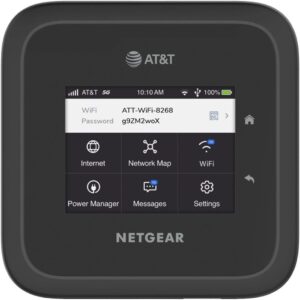
If you don’t want to rely on a mobile phone hotspot, we recommend using a dedicated mobile router such as the NETGEAR Nighthawk M6. It is designed for stable 4G and 5G connections and is far more reliable than tethering from a phone.
Bonded connections and multi-network setups
Relying on just one internet connection during a live match is risky. If it fails, the stream goes down.
Bonding means using more than one internet source at the same time. They work together as one stronger connection.
For example:
- Using SIM cards from different mobile networks together
- Using home internet with mobile data as backup
- Using mobile internet with a wired connection as a safety net
If one connection has a problem, the stream keeps going without viewers noticing.
This is how professional sports broadcasts stay live. Broadcasters like Sky Sports and Fox Sports never rely on a single internet connection when covering live sport.
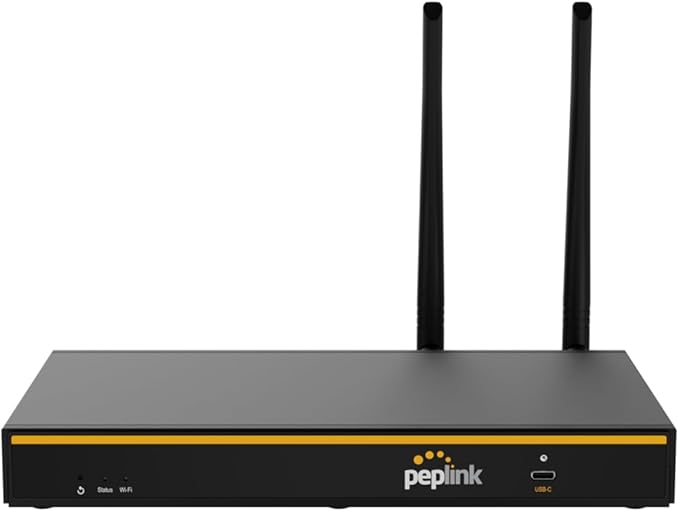
For bonding and multi-network setups, we recommend a dedicated router like the Peplink BPL-TWO. It combines multiple connections into one stable stream, keeping your broadcast live even if one connection drops.
Starlink for streaming sports matches
Best for: Rural or remote locations with limited infrastructure
Starlink has become a viable option where fibre and mobile networks are unreliable.
Advantages
- Works in remote areas
- Independent of local networks
- Consistent throughput
Limitations
- Higher delay than fibre
- Weather sensitivity
- Requires setup time and power
Some production teams combine Starlink with mobile bonding to achieve broadcast-level reliability.
Redundancy: what separates professional streams from amateur ones
Professional sports broadcasts do not assume the internet will work. They assume it might fail.
A basic redundancy setup includes:
- A primary connection
- A secondary backup connection
- A clear failover plan
This mindset is one of the biggest differences between professional and amateur sports streams.
How to test your internet before a live match
Avoid relying on:
- Speed tests alone
- Tests done days in advance
- Empty venue testing
Instead:
- Test at match time
- Test with spectators present
- Run a private test stream for 10 to 15 minutes
This mirrors how professional broadcast teams validate internet links before going live.
Final thoughts
Internet reliability is the foundation of every successful sports livestream.
If your connection is not stable, no amount of cameras, graphics, or overlays will save the broadcast. Prioritising upload stability, redundancy, and proper testing is what separates reliable sports streams from failed ones.
FAQ’s
What upload speed do I need to stream a sports match?
At least 6 to 10 Mbps for 1080p, with extra headroom for stability.
Is mobile internet reliable enough for sports streaming?
It can be, but congestion and signal strength make redundancy essential.
Do professional broadcasters use bonded internet connections?
Yes. Bonding multiple connections is standard practice in live sports broadcasting.
Can Starlink be used for live sports streaming?
Yes, particularly in remote locations, often paired with a backup connection.